🧩 UI Widgets
Supported Colors
Your system comes with modern built-in palettes. Customizing colors sets consistent backgrounds, boundaries, and texts:
primary, success, warning, danger, info, pink, violet, secondary, dark, light, emerald, and sky.
all colors are defined inside Color.php
📦 Accordion
Accordion is a modern, professional, and highly interactive UI component designed for Laravel. it offers seamless animations, themeable colors, and flexible configuration options.
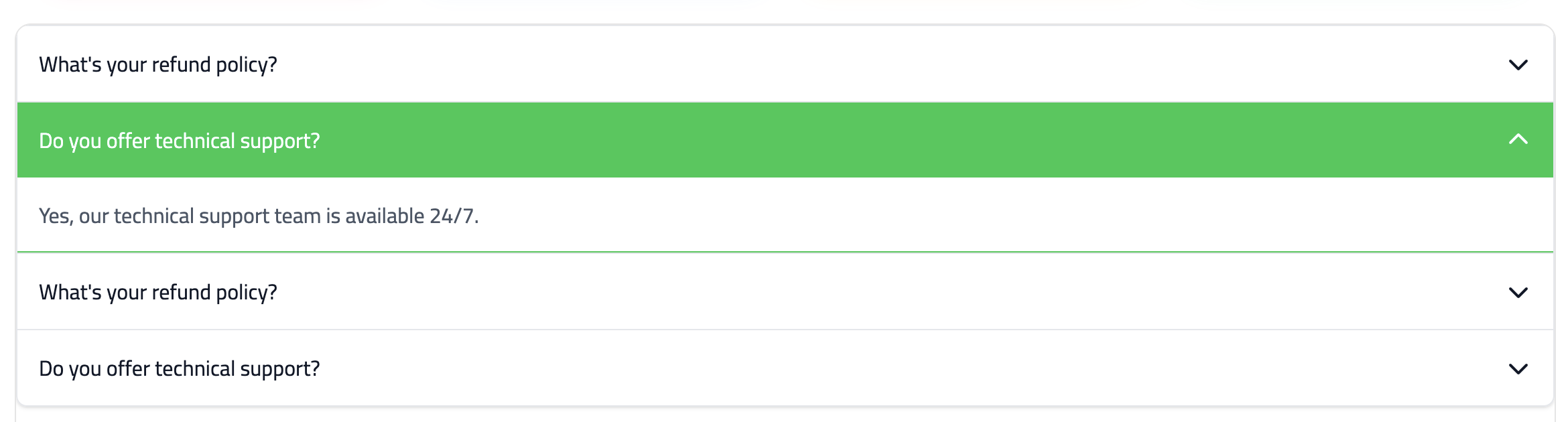
- Component API
<x-hwkui-accordion.group>
| Attribute | Type | Default | Description |
|---|---|---|---|
color |
string |
primary |
Controls the color theme for all items. |
animation |
string |
slide |
Options: slide, fade, none. |
collapse |
boolean |
false |
If true, closes other items when one is opened. |
expanded |
boolean |
false |
If true, Accordion will be expanded on load. |
<x-hwkui-accordion.item>
| Attribute | Type | Default | Description |
|---|---|---|---|
heading |
string |
- |
The title displayed in the item header. |
icon |
string |
chevron-down |
The icon component name to display. |
disabled |
boolean |
false |
Disables the item interaction. |
- Basic Usage
<x-hwkui-accordion.group color="primary" animation="slide">

    <x-hwkui-accordion.item heading="What is the refund policy?">
        If you are not satisfied with your purchase, we offer a 30-day money-back guarantee.
    </x-hwkui-accordion.item>

    <x-hwkui-accordion.item heading="How do I contact support?" icon="phone">
        Our support team is available 24/7 via email or live chat.
    </x-hwkui-accordion.item>

</x-hwkui-accordion.group>
📦 Alert
A modern, accessible notification banner component designed for Tailwind CSS v4. It supports multiple contextual color themes, customizable embedded icons, smart defaults, and decorative entrance animations.
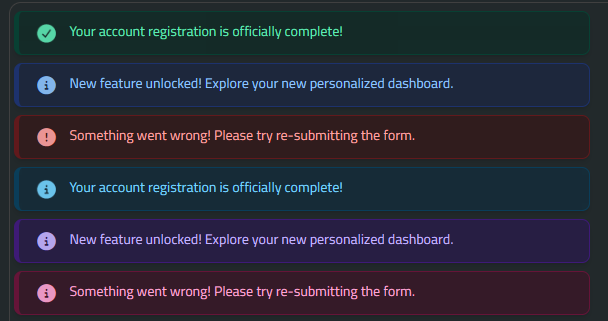
- Component API
| Attribute | Type | Default | Description |
|---|---|---|---|
color |
string |
primary |
Component color theme. Supports: primary, secondary, success, danger, warning, info, violet, pink. |
solid |
boolean |
false |
Component color theme. Use solid color instead of tone. |
icon |
string | null |
Auto |
Overrides the contextual default icon. Set to "false" to hide the icon area completely. |
animated |
boolean | string |
false |
When true, applies an active bounce physics effect to the icon element. |
- Basic Usage
<x-hwkui-alert color="danger">
    Something went wrong! Please try re-submitting the form.
</x-hwkui-alert>

Custom Icon & Animation

<x-hwkui-alert color="success" icon="cake-candles" animated="true">
    Your account registration is officially complete!
</x-hwkui-alert>

Modern Accent Colors (Violet)

<x-hwkui-alert color="violet" icon="sparkles">
    New feature unlocked! Explore your new personalized dashboard.
</x-hwkui-alert>

Text-Only Mode (Hidden Icon)

<x-hwkui-alert color="secondary" icon="false">
    Maintenance window scheduled tonight between 2:00 AM and 4:00 AM UTC.
</x-hwkui-alert>

Appending Utility Classes

<x-hwkui-alert color="warning" class="my-6 shadow-md border-dashed">
    Your subscription expires in 3 days. Please renew your plan.
</x-hwkui-alert>
📦 Badge
The Badge component is a flexible, highly customizable widget used to highlight statuses, counts, labels, or indicators. It supports multiple shape variants, built-in color themes (with full dark mode support), multiple sizing options, and automated icon prefix injection.


- Component API
| Attribute | Type | Default | Allowed Values | Description |
|---|---|---|---|---|
variant |
string |
solid |
solid | ghost | pill |
Defines the background/border style of the badge. |
color |
string, |
primary |
primary, secondary, success, emerald, danger, warning, info, violet, pink, dark, light |
Sets the visual theme color (supports dark mode out-of-the-box). |
size |
string |
sm |
sm | md | lg |
Modifies the font-size, padding, and internal icon scaling. |
icon |
string |
null |
Font Awesome icon name (e.g., bell, star, check) |
Automatically prepends the |
- Basic Usage
<x-hwkui-badge variant="solid" color="primary">Solid Badge</x-hwkui-badge>

<x-hwkui-badge variant="pill" color="violet">Pill Badge</x-hwkui-badge>

<x-hwkui-badge variant="ghost" color="pink">Ghost Badge</x-hwkui-badge>

<x-hwkui-badge size="sm" icon="star">Small</x-hwkui-badge>

<x-hwkui-badge size="md" icon="star">Medium</x-hwkui-badge>

<x-hwkui-badge size="lg" icon="star">Large</x-hwkui-badge>
📦 Card
A reusable friendly Card component built with Tailwind CSS v4, part of the hawkiq/hwkui widget library. It supports theme colors, outline and solid styles, optional icons, header tools, footer, and dark mode.
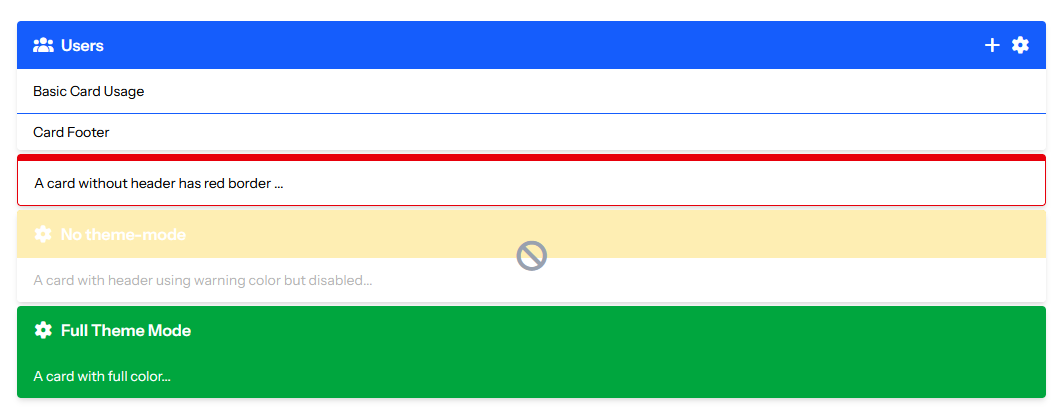
- Component API
| Attribute | Type | Default | Description |
|---|---|---|---|
title |
mixed | null |
Optional header title. |
icon |
mixed | null |
Optional icon rendered in the header. |
theme |
string/null |
null |
Semantic color used by full, default-header, and outline modes. |
theme-mode |
string/null |
null |
full colors the whole card, outline applies a themed border, and any other value uses the default white card. |
header-class |
string/null |
null |
Additional classes for the header. |
body-class |
string/null |
null |
Additional classes for the body. |
footer-class |
string/null |
null |
Constructor property available to the component; the current view uses the footer slot classes generated by the component. |
disabled |
boolean |
false |
Displays the disabled overlay when truthy. |
| default slot | mixed | required | Card body. |
tools slot |
mixed | absent | Optional header tools. |
footer slot |
mixed | absent | Optional footer. |
- Basic Usage
    <x-hwkui-card title="Users" icon="users" theme="primary">
        Basic Card Usage

        <x-slot name="tools">
            <button class="cursor-pointer text-white hover:text-gray-200">
                <x-hwkui-icon name="plus"></x-hwkui-icon>
            </button>
            <button class="cursor-pointer text-white hover:text-gray-200">
                <x-hwkui-icon name="cog"></x-hwkui-icon>
            </button>
        </x-slot>
        <x-slot name="footer">
            Card Footer
        </x-slot>
    </x-hwkui-card>


    <x-hwkui-card theme="danger" theme-mode="outline">
        A card without header has red border ...
    </x-hwkui-card>

    <x-hwkui-card icon="cog" title="No theme-mode" theme="warning" disabled>
        A card with header using warning color but disabled...
    </x-hwkui-card>

    <x-hwkui-card icon="cog" title="Full Theme Mode" theme="success" theme-mode="full">
        A card with full color...
    </x-hwkui-card>
📦 Carousel
A responsive, direction-aware carousel component for displaying multi-item card feeds, hero banners, and media showcases.
- Basic Usage
<x-hwkui-carousel.wrapper :items="$articles">
    @foreach ($articles as $article)
        <x-hwkui-carousel.item>
            <div class="relative w-full h-full rounded-xl overflow-hidden bg-zinc-800 p-6 text-white flex flex-col justify-end">
                <span class="text-xs text-amber-400 font-semibold uppercase">{{ $article->category }}</span>
                <h3 class="text-xl font-bold mt-2">{{ $article->title }}</h3>
            </div>
        </x-hwkui-carousel.item>
    @endforeach
</x-hwkui-carousel.wrapper>
- Component API
<x-hwkui-carousel.wrapper>
| Attribute | Type | Default | Description |
|---|---|---|---|
items |
int |
Required |
number of items inside the the array or collection. |
interval |
Integer |
5000 |
Time in milliseconds between auto-slides. |
breakpoints |
array |
['default' => 1] |
Array defining the number of items visible simultaneously across viewport breakpoints sm,md,lg . |
show-controls |
bool |
true |
Toggles the visibility of the previous and next navigation arrow buttons. |
show-indicators |
bool |
true |
Toggles the visibility of the pagination dot indicators at the bottom of the carousel. |
show-count |
bool |
true |
Toggles the visibility of the numerical range counter (e.g., 1 - 2 / 5) shown in the top corner. |
- Responsive Breakpoints
Customize how many slides are visible at specific screen sizes by passing a key-value array to the :breakpoints prop. Supported breakpoint keys are default, sm, md, and lg.
<x-hwkui-carousel.wrapper
    :items="$articles"
    :interval="4000"
    :breakpoints="[
        'default' => 1,
        'sm'      => 2,
        'md'      => 3,
        'lg'      => 5,
    ]"
>
    @foreach ($articles as $article)
        <x-hwkui-carousel.item>
            <x-hwkui-carousel.item>
            <div class="relative w-full h-full rounded-xl overflow-hidden bg-zinc-800 p-6 text-white flex flex-col justify-end">
                <span class="text-xs text-amber-400 font-semibold uppercase">{{ $article->category }}</span>
                <h3 class="text-xl font-bold mt-2">{{ $article->title }}</h3>
            </div>
        </x-hwkui-carousel.item>
        </x-hwkui-carousel.item>
    @endforeach
</x-hwkui-carousel.wrapper>
📦 Flip Card
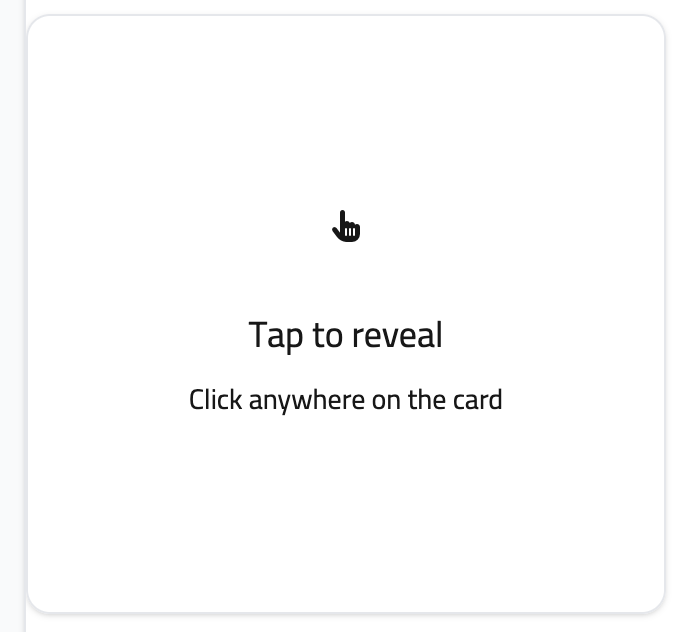
This component provides a smooth 3D flip animation. It supports both click and hover triggers and allows for custom heights.
| Front | Reveal |
|---|---|
 |
 |
- Component API
| Attribute | Type | Default | Description |
|---|---|---|---|
trigger |
string |
hover |
Defines the trigger event: hover or click. |
height |
string |
300 |
The height of the card. Accepts pixels (300px), rems (20rem), etc. |
- Basic usage
    <x-hwkui-flip-card trigger="click" class="max-w-xs">
        <x-slot:front>
            <div class="flex flex-1 flex-col items-center justify-center gap-2 text-center text-zinc-900 dark:text-zinc-200 dark:bg-zinc-900">
                <x-hwkui-icon name="hand-pointer" class="size-10 text-xl-center" aria-hidden="true" />
                <h3 class="text-lg font-semibold">Tap to reveal</h3>
                <p class="text-muted-foreground text-sm">Click anywhere on the card</p>
            </div>
        </x-slot:front>

        <x-slot:back>
            <div class="flex flex-1 flex-col items-center justify-center gap-2 text-center text-blue-800">
                <x-hwkui-icon name="gift" class="size-8 text-primary" aria-hidden="true" />
                <h3 class="text-lg font-semibold">You found it!</h3>
                <p class="text-muted-foreground text-sm">Click again to flip back</p>
            </div>
        </x-slot:back>
    </x-hwkui-flip-card>
📦 Glass Box
For display small infos with icons with Glass look

- Component API
| Attribute | Type | Default | Description |
|---|---|---|---|
title |
string |
required | Metric label. |
value |
int/float/string |
required | Display value. |
icon |
string |
required | Icon name passed to x-hwkui-icon. |
href |
string |
# |
Link target. |
color |
string |
zinc |
Semantic color or supported legacy alias. Unknown values use the neutral zinc treatment. |
- Basic Usage
<x-hwkui-glass-box title="Downloads" value="251" icon="download" href="/admin"
    color="blue" />

<x-hwkui-glass-box title="Products" :value="700" icon="cog" href="/admin" color="emerald" />

<x-hwkui-glass-box title="Categories" :value="30" icon="list" href="/admin" color="amber" />
📦 Icon
The Icon component provides a clean shorthand syntax for rendering Font Awesome icons. It automatically handles structural classes, provides simple shorthand flags for icon weights, and seamlessly merges any custom Tailwind utility classes.
install FontAwesome and import
| app.css | |
|---|---|
- Component API
| Attribute | Type | Default | Description |
|---|---|---|---|
name |
string |
Required | The name of the Font Awesome icon (e.g., "user", "github"). |
type |
string |
"s" |
The weight/type variant. Accepts shorthands (s, b, r, l, t, d) or full names. |
-
Weight Shorthand Matrix
-
s/solid→fa-solid b/brands→fa-brandsr/regular→fa-regularl/light→fa-lightt/thin→fa-thin-
d/duotone→fa-duotone -
Basic Usage
<!-- Brand Icon with Color Utilities -->
<x-hwkui-icon name="github" type="b" class="text-gray-900 text-xl" />
📦 Info Box
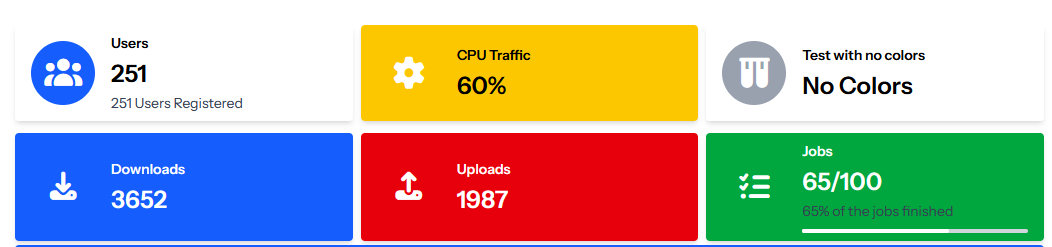
For display small infos with icons or progress bar
- Component API
| Attribute | Type | Default | Description |
|---|---|---|---|
title |
mixed | null |
Display title. |
text |
mixed | null |
Main value. |
icon |
mixed | null |
Icon name. |
description |
mixed | null |
Supporting description. |
url |
mixed | null |
Optional title link. |
url-target |
string |
_self |
Link target. |
theme |
string/null |
null |
Semantic box color. Without a theme, the box uses its neutral surface. |
icon-theme |
string/null |
null |
Semantic icon background color. Without it, the icon uses gray. |
progress |
numeric/null |
null |
Progress value clamped to 0 through 100. |
progress-theme |
string |
white |
Semantic progress color. Unknown values use bg-white. |
- Basic Usage
<x-hwkui-info-box title="Users" text="251" icon="users" iconTheme="primary"
    description="251 Users Registered" url="https://osama.app" urlTarget="_blank" />

<x-hwkui-info-box title="CPU Traffic" text="60%" icon="cog" theme="warning" iconTheme="warning" />

<x-hwkui-info-box title="Test with no colors" text="No Colors" icon="vials" />

<x-hwkui-info-box title="Downloads" text="3652" icon="download" theme="primary" iconTheme="primary" />

<x-hwkui-info-box title="Uploads" text="1987" icon="upload" theme="danger" iconTheme="danger" />

<x-hwkui-info-box title="Jobs" text="65/100" description="65% of the jobs finished" icon="tasks"
    theme="success" iconTheme="success" progress="65" />
📦 Marquee
This component provides a smooth, customizable, and accessible way to display scrolling content such as logos, badges, or text.
- Compoenent API
| Attribute | Type | Default | Description |
|---|---|---|---|
direction |
string |
left |
Direction of the scroll (left, right, up, down). |
duration |
string |
20s |
The time it takes for one full loop. |
gap |
string |
1rem |
The space between items in the marquee. |
pauseOnHover |
boolean |
false |
If set, the animation will pause when the user hovers over the component. |
fade |
boolean |
false |
Adds a linear gradient mask to the edges to create a smooth fade-in/fade-out effect. |
- Basic Usage
<x-hwkui-marquee direction="right" pauseOnHover duration="10s" fade class="w-full max-w-xl py-1">

    @foreach (['🚀 Fast', '♿ Accessible', '🎨 Themeable', '📦 Copy & own', '🌙 Dark mode'] as $f)
        <x-hwkui-badge class="whitespace-nowrap">{{ $f }}</x-hwkui-badge>
    @endforeach

</x-hwkui-marquee>
📦 Small Box
For display one info with beautiful UI

- Component API
| Attribute | Type | Default | Description |
|---|---|---|---|
title |
mixed | null |
Main heading. |
text |
mixed | null |
Supporting value. |
icon |
mixed | null |
Decorative icon name. |
theme |
string/null |
null |
Semantic background color. Without a theme, the box uses its neutral surface. |
url |
mixed | null |
Optional link URL. |
url-text |
mixed | null |
Link label; the link is shown only when both url and url-text are present. |
url-icon |
mixed | null |
Optional link icon name. |
loading |
boolean/mixed |
false |
Shows a loading overlay. |
- Basic Usage
<x-hwkui-small-box title="251" text="Users" icon="users" theme="primary" url="https://osama.app"
    urlText="View all users" urlIcon="link" />

<x-hwkui-small-box title="Loading" text="Loading data..." icon="tasks" theme="success"
    url="https://osama.app" urlText="More info" urlIcon="link" loading="true" />

<x-hwkui-small-box title="424" text="Views" icon="eye" theme="danger"
    url="https://osama.app" urlText="View details" urlIcon="link" />

<x-hwkui-small-box title="Downloads" text="1205" icon="download" />
📦 Tabs
The Tabs Widget provides a modern, interactive, and highly customizable way to organize content.
- Component API
<x-hwkui-tabs.tabs>
| Attribute | Type | Default | Description |
|---|---|---|---|
default |
string |
tab1 |
The name of the tab that should be open on page load. |
variant |
string |
classic |
"The visual style of the tabs. Options: 'classic', 'pills'." |
color |
string |
primary |
"The active color theme. Supports all standard hwkui colors (primary, success, danger, warning, etc.)." |
<x-hwkui-tabs.head>
| Attribute | Type | Default | Description |
|---|---|---|---|
name |
string |
Required | Unique identifier for the tab. Must match a name in a <x-hwkui-tabs.content> component. |
icon |
string |
null |
Name of the icon to display (passed to <x-hwkui-icon>). |
badge |
string |
null |
Text or number to display in a notification badge next to the title. |
badgeColor |
string |
danger |
The color of the badge (passed to <x-hwkui-badge>). |
<x-hwkui-tabs.content>
| Attribute | Type | Default | Description |
|---|---|---|---|
name |
string |
Required | Must match the name of the corresponding <x-hwkui-tabs.head> trigger. |
- Basic Usage
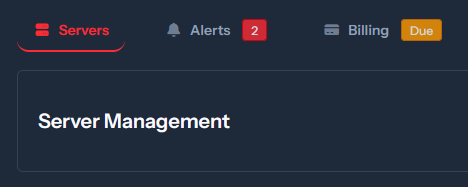
For a simple, clean, classic underline tab setup:
<x-hwkui-tabs.tabs default="servers">

    <x-hwkui-tabs.head-wrapper>
        <x-hwkui-tabs.head name="servers">Servers</x-hwkui-tabs.head>
        <x-hwkui-tabs.head name="alerts">Alerts</x-hwkui-tabs.head>
        <x-hwkui-tabs.head name="billing">Billing</x-hwkui-tabs.head>
    </x-hwkui-tabs.head-wrapper>

    <x-hwkui-tabs.content-wrapper>
        <x-hwkui-tabs.content name="servers">
            servers settings go here.
        </x-hwkui-tabs.content>
        <x-hwkui-tabs.content name="alerts">
            alerts settings go here.
        </x-hwkui-tabs.content>
        <x-hwkui-tabs.content name="billing">
            billing settings go here.
        </x-hwkui-tabs.content>
    </x-hwkui-tabs.content-wrapper>

</x-hwkui-tabs.tabs>

<!-- Advanced Usage (Pills & Badges)-->

 <x-hwkui-tabs.tabs default="server" variant="pills" color="primary">

    <x-hwkui-tabs.head-wrapper>
        <x-hwkui-tabs.head name="server" icon="server">
            Servers
        </x-hwkui-tabs.head>

        <x-hwkui-tabs.head name="alerts" icon="bell" badge="2" badgeColor="danger">
            Alerts
        </x-hwkui-tabs.head>

        <x-hwkui-tabs.head name="billing" icon="credit-card" badge="Due" badgeColor="warning">
            Billing
        </x-hwkui-tabs.head>
    </x-hwkui-tabs.head-wrapper>

    <x-hwkui-tabs.content-wrapper>
        <x-hwkui-tabs.content name="server">
            <h3 class="text-xl font-bold">Server Management</h3>
        </x-hwkui-tabs.content>

        <x-hwkui-tabs.content name="alerts">
            <h3 class="text-xl font-bold text-red-500">Critical Alerts</h3>
        </x-hwkui-tabs.content>

        <x-hwkui-tabs.content name="billing">
            <h3 class="text-xl font-bold">Invoices</h3>
        </x-hwkui-tabs.content>
    </x-hwkui-tabs.content-wrapper>

</x-hwkui-tabs.tabs>
📦 Timeline
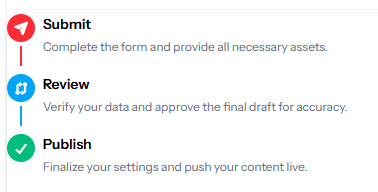
A versatile, highly configurable, dynamic timeline component for Laravel Blade applications built with Tailwind CSS. It supports vertical/horizontal flows, automated collection mapping, and complete granular slot overrides.
Component API
<x-hwkui-timeline.timeline>
The main layout wrapper that handles orientation and sets the global design context.
| Attribute | Type | Default | Description |
|---|---|---|---|
items |
Collection | array | null |
null |
Passing data into this unlocks automated loop mapping. |
title-column |
string | null |
null |
Key name to fetch the title from items. |
body-column |
string |null |
null |
Key name to fetch description body from items. |
direction |
string |
vertical |
vertical or horizontal structural rendering. |
color |
string |
primary |
Sets global theme color for indicators and lines. |
length |
string |
short |
short or long for vertical length connector. |
<x-hwkui-timeline.indicator>
The timeline hub point containing indicators and dynamic milestone bridge lines.
| Attribute | Type | Default | Description |
|---|---|---|---|
variant |
string |
'solid' |
'solid' (filled badge background) or 'borderless'. |
state |
string |
'completed' |
Passing 'last' breaks structural tracking and safely terminates lines. |
color |
string\|null |
null |
Pulls context theme; passing values explicitly overrides individual instances. |
Basic Usage
- Simple Version (Automated Collection Rendering)
When you pass an absolute collection data object into the
:itemsarray attribute, the timeline component handles all inner loops, mapping, checkmark icon injections, and terminates trailing lines flawlessly without extra layout markup.
<x-hwkui-timeline.timeline
    :items="$users"
    title-column="name"
    body-column="email"
    direction="horizontal"
    color="success"
/>
- Customized Version
For granular layouts, omit the :items attribute. You gain full creative authority to use conditional blade assertions inside, modify individual milestone theme colors, toggle distinct custom icons, or switch presentation variants.
Crucial Rule for Manual Loops
You must provide :state="$loop->last ? 'last' : 'completed'" or state="last" to your inner indicator so that the trailing line safely clips off at the end of your tracking row!
<x-hwkui-timeline.timeline direction="vertical" color="primary">
    @foreach ($users as $user)
        <x-hwkui-timeline.item>

            <x-hwkui-timeline.indicator
                :state="$loop->last ? 'last' : 'completed'"
                :color="$user->hasRole('admin') ? 'danger' : null"
                variant="solid"
            >
                <i class="fas fa-{{ $user->hasRole('admin') ? 'shield-alt' : 'user' }}"></i>
            </x-hwkui-timeline.indicator>

            <x-hwkui-timeline.content>
                <x-hwkui-timeline.title>
                    {{ $user->name }}
                    <span class="text-xs text-gray-400">({{ $user->username }})</span>
                </x-hwkui-timeline.title>

                <x-hwkui-timeline.body>
                    {{ $user->roles->pluck('display_name')->join(', ') }}
                </x-hwkui-timeline.body>
            </x-hwkui-timeline.content>

        </x-hwkui-timeline.item>
    @endforeach
</x-hwkui-timeline.timeline>
📦 Tour
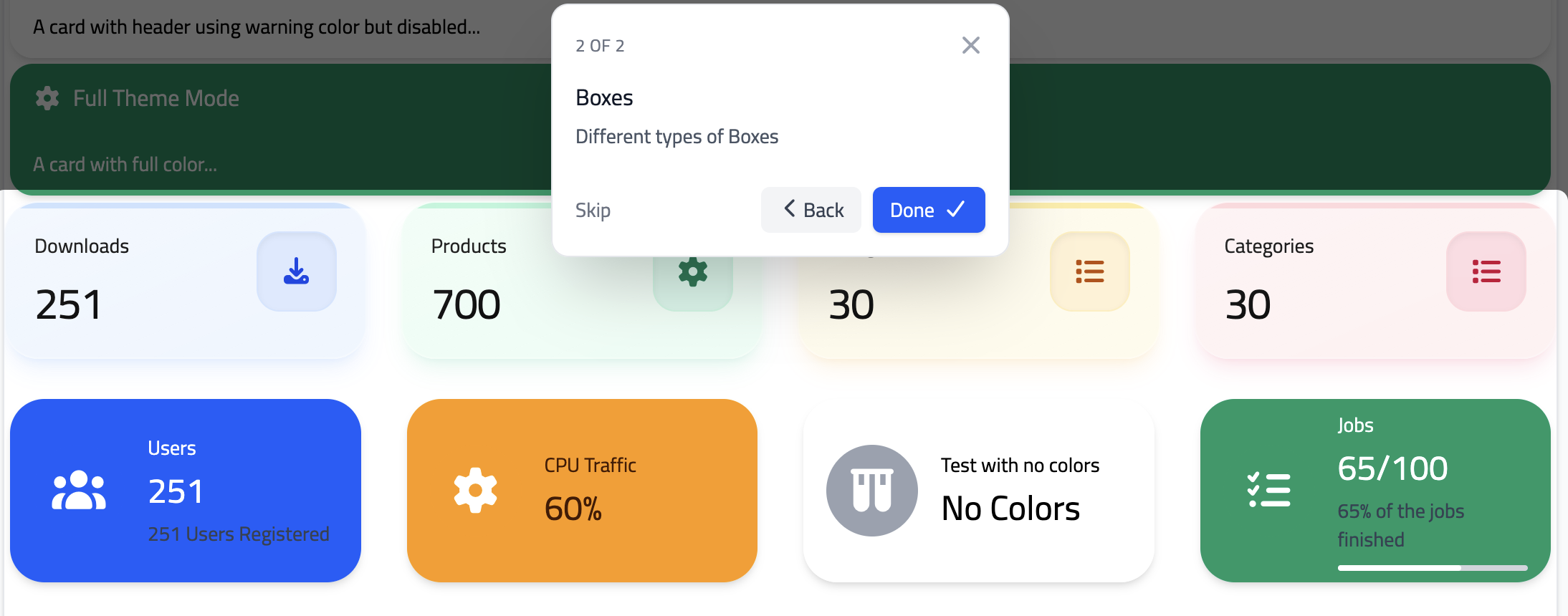
A high-performance, accessible, and lightweight Onboarding Tour component.
- Component API
| Attribute | Type | Default | Description |
|---|---|---|---|
steps |
array |
[] |
An array of step objects defining the tour sequence (see Step Configuration). |
open |
boolean |
false |
Determines if the tour starts immediately upon page load. |
- Step Configuration
| Attribute | Type | Description |
|---|---|---|
target |
string |
CSS selector for the element (e.g., #my-id). |
title |
string |
The heading of the popover card. |
body |
string |
The descriptive text for the step. |
placement |
string |
Preferred side: top, bottom, left, or right. |
- Basic Usage
<?php

    $steps = [
        [
            'target' => '#search-bar',
            'title' => 'Search',
            'body' => 'Use this bar to find your documents quickly.',
            'placement' => 'bottom',
        ],
        [
            'target' => '#user-profile',
            'title' => 'Profile Settings',
            'body' => 'Click here to manage your account details.',
            'placement' => 'left',
        ],
    ];
 <x-hwkui-tour :steps="$steps">
    <button @click="start()" class="btn-primary">
        Take the Tour
    </button>
</x-hwkui-tour>
📦 Typewriter
A robust,typewriter effect component for texts.
- Component API
| Attribute | Type | Default | Description |
|---|---|---|---|
words |
array |
[] |
Array of strings to cycle through. |
type-speed |
int |
70 |
Delay between each character typed (in ms). |
delete-speed |
int |
35 |
Delay between each character deleted (in ms). |
pause-time |
int |
1500 |
Duration to wait before deleting the completed word (in ms). |
loop |
bool |
true |
Whether to cycle through the words indefinitely. |
cursor |
bool |
true |
Whether to display the blinking typing caret. |
html |
bool |
false |
If set true html content can be viewed in typewriter. |
- Basic Usage
    I Love <x-hwkui-typewriter
    :words="['Games', 'Programming', 'Traveling','Making Packages']"
    type-speed="70"
    delete-speed="10"
    class="text-primary font-semibold" />